
Templates are becoming vital tools for increasing productivity, preserving consistency and streamlining operations in today’s hectic corporate climate. The appropriate template may increase productivity and save time while managing a project, producing branded content or organising business papers.
Teams may reduce repeated labour while maintaining organization with the use of project management, design and documentation templates. Businesses may simplify processes and concentrate more on execution and innovation by using pre-designed frameworks rather than starting from scratch.
Businesses across many sectors, from startups and remote teams to massive corporations, depend on templates to keep things organised and foster better teamwork. Additionally, templates promote departmental communication, standardise operations and lower operational mistakes.
Why Businesses Rely on Templates Today
Modern businesses rely heavily on templates because they improve workflow consistency and reduce the time spent on repetitive administrative tasks. From startups managing remote teams to enterprises handling large-scale operations, templates have become essential for organizing projects and documentation efficiently.
Experienced project managers often use templates to standardize workflows across departments. This ensures that teams follow the same structure for planning, reporting, communication and execution.
Based on modern workflow practices, businesses increasingly rely on collaborative templates to reduce communication gaps and improve project efficiency across remote teams.
Templates are especially useful for:
- Remote collaboration
- Agile project management
- Marketing campaign planning
- Documentation management
- Financial tracking
- Design consistency
Organizations that use structured templates often experience better productivity, fewer communication issues and improved operational efficiency.
What Are Templates and Why Are They Important?
Templates are pre-designed structures that enable individuals and teams to execute activities more quickly and reliably. They offer a standardised framework for organising data, coordinating projects and producing professional-looking papers or drawings.
Templates provide a ready-made structure that can be customized to meet project requirements rather than having to start from scratch each time.
Benefits of Using Templates
- Saves time and reduces repetitive work
- Improves workflow efficiency
- Maintains consistency across teams
- Reduces human error
- Simplifies collaboration
- Enhances organization and planning
- Helps businesses scale processes more efficiently
Templates are used by businesses of all sizes to increase efficiency while maintaining professional standards.
Best Project Management Templates
Project management templates help teams plan, organize and track projects effectively. These templates improve communication, task management, budgeting and scheduling.
1. Gantt Chart Template
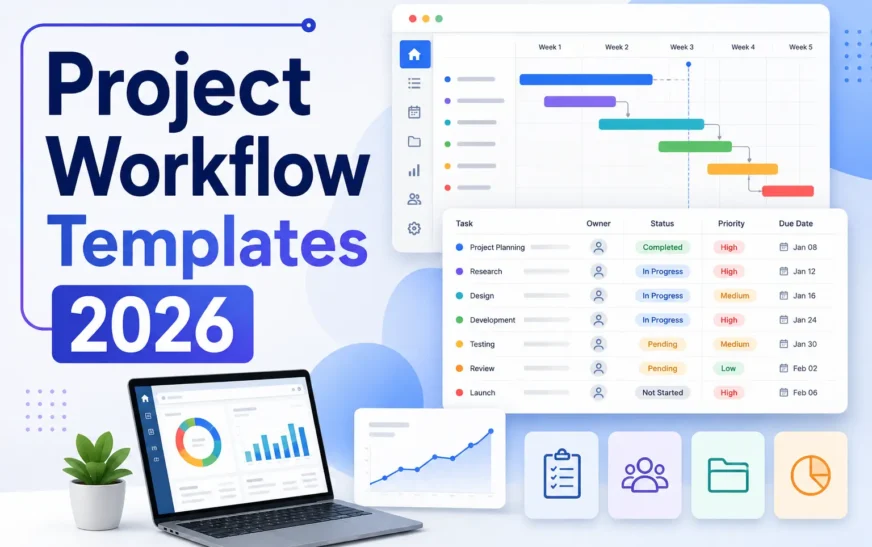
A Gantt chart template provides a visual timeline of project tasks, deadlines and dependencies. It helps project managers understand how tasks relate to each other and ensures projects stay on schedule.
Best For
- Large projects
- Teams with multiple deadlines
- Complex workflows
- Construction and software development projects
Benefits
- Better project visibility
- Improved task coordination
- Easier deadline tracking
- Clear understanding of dependencies
2. Project Timeline Template
Project timeline templates provide a simplified overview of key milestones and project stages. Unlike Gantt charts, timelines focus more on major events rather than detailed task management.
Best For
- Stakeholder presentations
- Client updates
- High-level project planning
- Marketing campaign planning
Benefits
- Easy-to-understand visual planning
- Better communication
- Quick progress tracking
- Simplified reporting
3. Task Management Template
Task management templates help teams organize assignments, responsibilities and project progress. Popular project management tools like Trello, Asana and Monday.com use these templates extensively.
Common Sections
- Task name
- Assigned team member
- Deadline
- Priority level
- Status tracking
- Progress percentage
Benefits
- Improves accountability
- Simplifies team collaboration
- Tracks workflow progress
- Prevents missed deadlines
4. Budget Tracking Template
Budget tracking templates help businesses monitor project expenses and avoid overspending. These templates organize costs into categories and make financial reporting easier.
Benefits
- Better expense management
- Improved financial planning
- Prevents budget overruns
- Simplifies reporting
5. Risk Management Template
Risk management templates help organizations identify potential risks, evaluate their impact and create action plans to minimize problems before they occur.
Best For
- Enterprise projects
- IT projects
- Construction planning
- Product launches
Benefits
- Reduces unexpected project delays
- Improves decision-making
- Enhances project safety
- Improves contingency planning
Real-World Template Usage
Templates are commonly used by marketing departments, software firms, startups and businesses to increase workflow efficiency, collaboration and documentation management. Templates assist teams stay organised while eliminating repeated labour in areas like as content planning, Agile processes, budgeting and reporting.
Project Management Template Comparison
| Template Type | Best For | Difficulty Level | Free Options Available | Popular Platforms |
| Gantt Chart Template | Large projects | Medium | Yes | ClickUp, Smartsheet |
| Project Timeline Template | Presentations & milestones | Easy | Yes | PowerPoint, Canva |
| Task Management Template | Team collaboration | Easy | Yes | Trello, Asana |
| Budget Tracking Template | Expense management | Easy | Yes | Excel, Google Sheets |
| Risk Management Template | Enterprise projects | Medium | Yes | Notion, Airtable |
Best Design Templates
Design templates help businesses and creators produce visually appealing content quickly while maintaining brand consistency.
Presentation Templates
Presentation templates provide professionally designed slide layouts for business meetings, pitches and educational content.
Popular Platforms
- Canva
- Google Slides
- Microsoft PowerPoint
Benefits
- Saves design time
- Improves presentation quality
- Maintains branding consistency
- Enhances visual communication
Social Media Templates
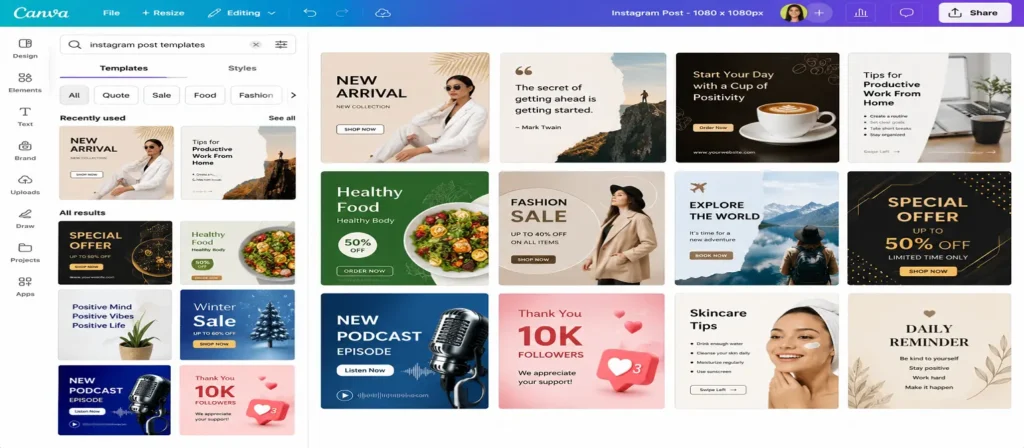
Social media templates are pre-designed graphics optimized for platforms like Instagram, Facebook, LinkedIn and Pinterest.
Benefits
- Faster content creation
- Consistent visual identity
- Better social media branding
- Increased engagement
These templates are especially useful for marketers and content creators managing multiple platforms.
Website Layout Templates
Website templates simplify the process of building professional websites without advanced coding knowledge.
Popular Platforms:
- WordPress
- Wix
- Squarespace
Benefits:
- Quick website setup
- Responsive design
- Easy customization
- Professional appearance
Website layout templates are ideal for small businesses, bloggers and startups.
Brand Style Guide Templates
A brand style guide template helps companies maintain consistency across all marketing channels by documenting branding rules.
Includes
- Logo usage
- Typography
- Color palette
- Image style guidelines
- Tone of voice recommendations
Benefits
- Stronger brand identity
- Consistent marketing materials
- Better communication between teams
- Professional brand presentation
Best Documentation Templates
Documentation templates help organizations maintain clear and structured records for internal communication and business operations.
Meeting Notes Template
Meeting note templates organize discussion points, action items and decisions made during meetings.
Benefits
- Improves accountability
- Keeps records organized
- Simplifies follow-ups
- Enhances communication
Project Proposal Template
Project proposal templates provide a structured format for presenting project goals, budgets, timelines and expected outcomes.
Benefits
- Professional presentation
- Better stakeholder communication
- Faster approval process
- Improved planning
Standard Operating Procedure (SOP) Template
Standard Operating Procedure (SOP) templates help businesses document repeatable processes and maintain consistency across daily operations. These templates are essential for organizations that need clear instructions, quality control and standardized workflows.
An SOP template usually contains step-by-step procedures, employee responsibilities, safety instructions, workflow guidelines and compliance requirements. By following a structured SOP, businesses can reduce operational confusion and improve efficiency.
SOP templates are particularly important for industries where accuracy and consistency are critical.
Common Industries Using SOP Templates
- Healthcare
- Manufacturing
- Information technology
- Customer support
- Logistics and supply chain
- Finance and accounting
- Human resources
Benefits of SOP Templates
1. Standardized Workflows
SOP templates ensure that every employee follows the same procedures, which improves consistency across departments.
2. Reduced Operational Errors
Clear documentation helps minimize mistakes and improves accuracy in daily tasks.
3. Faster Employee Training
New employees can learn processes more quickly with detailed SOP documentation.
4. Better Compliance Management
Businesses operating in regulated industries can use SOP templates to meet legal and compliance requirements.
5. Improved Team Productivity
When workflows are clearly documented, employees spend less time asking questions and more time completing tasks efficiently.
Popular Tools for SOP Templates
- Google Docs
- Microsoft Word
- Notion
- Confluence
- ClickUp
- Process Street
Example of an SOP Workflow
A customer support company may use an SOP template for handling customer complaints. The document can include:
- Response timelines
- Escalation procedures
- Communication guidelines
- Resolution steps
- Reporting process
This ensures every support agent follows the same process and delivers a consistent customer experience.
SOP templates are one of the most valuable documentation tools for businesses that want to improve operational consistency and scale efficiently.
Annual Report Template
Annual report templates help businesses and organizations present financial performance, company achievements, future goals and operational highlights in a professional format.
These templates are commonly used by corporations, startups, nonprofits and educational institutions to communicate important yearly updates to investors, stakeholders, employees and customers.
An annual report template typically includes:
- Executive summary
- Financial statements
- Business performance overview
- Company milestones
- Future goals and strategy
- Charts and visual reports
- Team and leadership information
Key Benefits of Annual Report Templates
1. Professional Presentation
Annual report templates help organizations present information in a clean, structured and visually appealing format.
2. Better Stakeholder Communication
They improve communication with investors, employees, clients and partners by presenting business performance clearly.
3. Improved Data Visualization
Templates make it easier to include charts, graphs and infographics for financial reporting and performance analysis.
4. Time-Saving Workflow
Instead of creating reports from scratch every year, businesses can reuse structured templates and simply update the latest information.
5. Stronger Brand Consistency
Annual report templates help companies maintain consistent branding across official business documents.
Popular Tools for Annual Report Templates
- Canva
- Microsoft PowerPoint
- Adobe InDesign
- Google Slides
- Visme
Example Use Cases
A startup company may use an annual report template to present:
- Revenue growth
- Product launches
- Customer growth statistics
- Future expansion plans
This helps build trust with investors and improves transparency.
Annual report templates are essential for businesses that want to present company performance professionally while maintaining organized documentation and branding.
Design and Documentation Templates Compared
| Template Category | Main Purpose | Best Users | Popular Tools |
| Presentation Templates | Business presentations | Teams & marketers | Canva, PowerPoint |
| Social Media Templates | Content creation | Influencers & brands | Canva, Adobe Express |
| Website Templates | Website building | Bloggers & businesses | WordPress, Wix |
| SOP Templates | Process documentation | Enterprises | Notion, Google Docs |
| Proposal Templates | Project planning | Agencies & startups | Microsoft Word |
Free vs Premium Templates
Free templates are perfect for startups, freelancers and small teams since they are simple to use and affordable. Premium templates provide advanced customisation, integrations and professional designs for enterprises with complicated operations.
The best option is determined by the size of your project, the need for cooperation and the budget.
Where to Find High-Quality Templates
You can find professional templates on several platforms, including:
Project Management Platforms
- Asana
- Monday.com
- Trello
- ClickUp
- Smartsheet
Design Platforms
- Canva
- Adobe Express
- Figma
- Visme
Productivity Tools
- Google Docs
- Microsoft Office
- Notion
- Airtable
These platforms offer both free and premium templates for different business needs.
How to Choose the Right Template
Before selecting a template, consider the following factors:
1. Project Complexity
Choose templates based on the size and complexity of your workflow.
2. Team Size
Larger teams sometimes require additional collaboration tools.
3. Industry Requirements
Some sectors demand more thorough paperwork and compliance monitoring.
4. Customization Options
Flexible templates make it easy to tailor them to your company’s specific requirements.
5. Collaboration Features
Cloud-based templates enable easy collaboration among remote teams.
6. Budget
Many free themes provide outstanding functionality for small enterprises and startups.
The perfect template should simplify, not complicate, your routine.
Best Practices for Managing Templates
To improve efficiency, businesses should store templates in a centralized location, use clear naming conventions, update templates regularly and avoid creating unnecessary duplicate versions. Proper organization improves collaboration and workflow consistency.
Common Mistakes to Avoid When Using Templates
Even the greatest templates might become ineffectual if not used properly.
Overcomplicating the Template
Too many parts and needless features might cause confusion among team members.
Ignoring Customization
Templates should be tailored to your process rather than copied precisely.
Poor Organization
Using out-of-date or inconsistent templates might cause communication issues.
Lack of Team Training
Employees need to learn how to use templates efficiently.
How Templates Are Evolving in Modern Workflows
Templates are getting increasingly sophisticated and smarter as companies continue to use digital workflows.
Modern platforms now offer:
- AI-powered automation
- Smart recommendations
- Real-time collaboration
- Workflow integrations
- Cloud synchronization
AI-powered project management solutions are projected to play a significant role in increasing productivity and streamlining documentation procedures in the future years.
Expert Tips for Using Templates
Keep templates simple, customizable and consistent across teams. Businesses should also review templates regularly and combine them with collaboration tools like Notion, ClickUp or Asana to improve workflow efficiency.
Closing Thoughts
Templates play a crucial role in improving productivity, organization and consistency across modern businesses. Whether you are managing projects, designing marketing materials or creating professional documents, the right templates can significantly reduce workload and improve efficiency.
By using project management, design and documentation templates, teams can focus more on creativity, strategy and execution instead of repetitive formatting tasks.
As businesses continue adopting digital workflows, templates will remain essential tools for streamlining operations and improving collaboration.
Choosing the right template can help organizations improve communication, maintain consistency and achieve better project outcomes. With hundreds of free and premium options available online, businesses can easily find templates that match their goals and workflows.
Frequently Asked Questions (FAQs)
What is the best project management template?
The best project management template depends on your workflow and project size. Gantt chart templates are ideal for large projects, while task management templates work well for daily collaboration.
Are project management templates free?
Yes, many platforms like Trello, Canva, ClickUp, Google Docs and Notion offer free project management and documentation templates.
Which template is best for remote teams?
Task management templates and collaborative documentation templates are best for remote teams because they improve communication and task tracking.
Can I customize templates?
Most modern templates are fully customizable. You can modify colors, layouts, workflows and sections according to your project requirements.
What tools provide the best templates?
Popular tools for templates include:
- Canva
- Trello
- Asana
- ClickUp
- Notion
- Google Docs
- Microsoft Office
Why are templates important in business?
Templates improve efficiency, reduce repetitive work, maintain consistency and help teams stay organized.