

Have you ever finished an important phone call and wished you had recorded it? Maybe it was a business agreement, a customer complaint or simply something you did not want to forget. Recording phone calls on Android is completely possible, but before you tap that record button, there are a few things you really need to know.
This guide covers how to record phone calls on Android legally, which devices support it natively, the best apps to use and most importantly, what the law says in your country.
Is It Legal to Record Phone Calls on Android?
This is the most important question and most people skip straight past it.
The honest answer is: it depends on where you live.
Most countries fall into one of two categories:
One-party consent — only one person on the call needs to know it is being recorded. That person can be you. This applies in the UK, most of Europe, India, Pakistan and many other countries.
Two-party consent — everyone on the call must agree to being recorded. This is the law in some US states like California, Florida and Illinois. If you record someone without their knowledge in these states, you could face serious legal consequences.
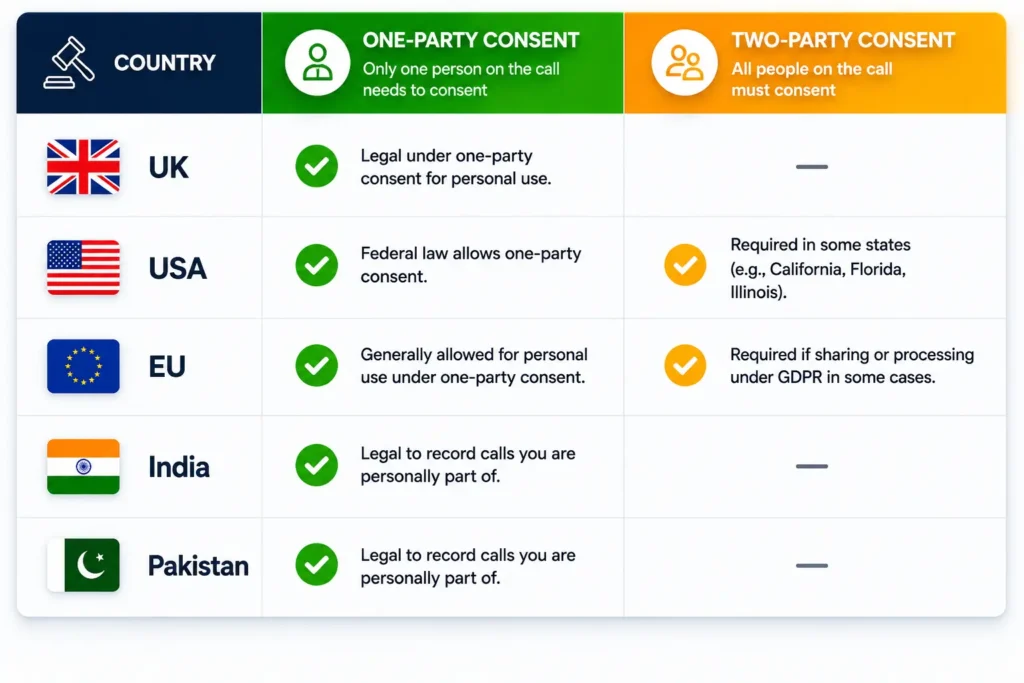
Here is a quick breakdown by region:
- 🇬🇧 UK — Legal under one-party consent. You can record your own calls but should not share recordings without a valid reason
- 🇺🇸 USA — Varies by state. Federal law allows one-party consent but some states require two-party consent
- 🇪🇺 EU — GDPR applies. Recording calls for personal use is generally fine but sharing them is restricted
- 🇮🇳 India — Legal to record your own calls for personal use
- 🇵🇰 Pakistan — Legal to record calls you are personally part of
Laws vary widely — always verify the rules for your specific country by checking the full list of international call recording laws by country.
The safest approach no matter where you live? Tell the other person you are recording the call. It takes two seconds and protects you completely.
Does Your Android Phone Support Built-In Call Recording?
Not every Android phone lets you record calls out of the box. This surprises a lot of people.
Here is a rough guide by brand:
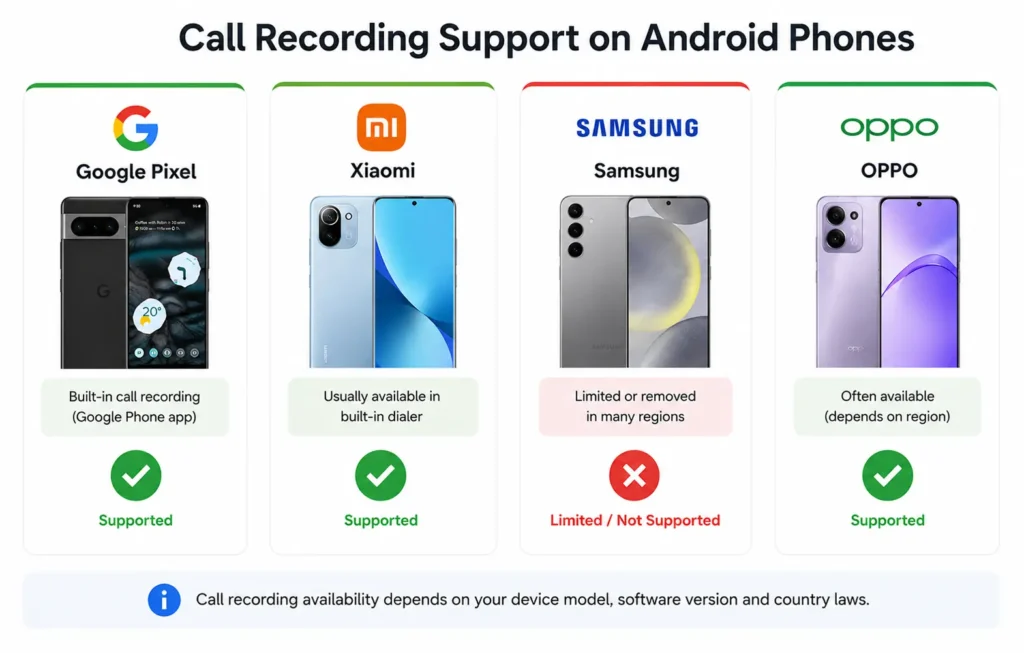
- Google Pixel — Yes, built-in recording via the Phone app with automatic notification to both parties
- Xiaomi / Redmi — Usually available in the built-in dialler, especially on devices sold in Asia
- OPPO / Realme / OnePlus — Often available depending on your region and software version
- Samsung — Removed native call recording in many countries including the UK and most of Europe due to legal pressure
If you are not sure whether your phone has it, open your Phone app, make a call and look for a Record button on the call screen. If it is not there, your device either does not support it or it has been disabled in your region.
How to Record Calls Using the Google Phone App
If you have a Google Pixel or a device running Android One with the Google Phone app, you are in luck. This is the cleanest and most reliable way to record calls on Android.
Here is how to do it:
1. Open the Phone app and make or receive a call
2. During the call, look for the Record button on the call screen
3. Tap it — both you and the other person will hear an automatic announcement that the call is being recorded
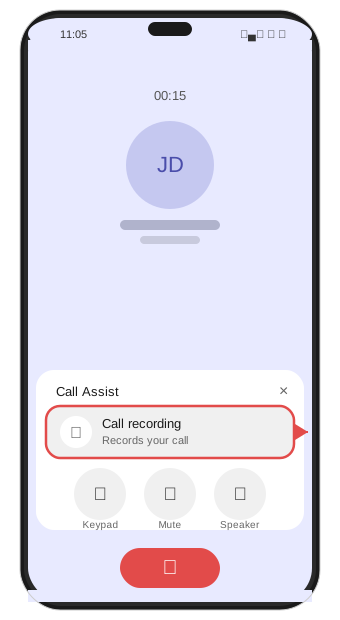
4. To stop recording, tap the Record button again
5. Once the call ends, find the recording by going to Recents, tapping on the call and selecting the recording
For full details on supported devices and regions, check Google’s official call recording guide.
Your recordings are saved directly in the Phone app — no third-party storage needed. Simple and clean.
One thing worth noting: Google deliberately notifies both parties when recording starts. You cannot turn this off. It is their way of keeping things legal regardless of where you are in the world.
How to Record Phone Calls on Samsung Android
Samsung used to have a built-in call recording feature that worked really well. Unfortunately, they removed it from devices sold in the UK, Europe and several other regions after legal concerns were raised.
If you are in a region where Samsung still supports it, you will see a Record option on your call screen — use it the same way as the Google Phone app above.
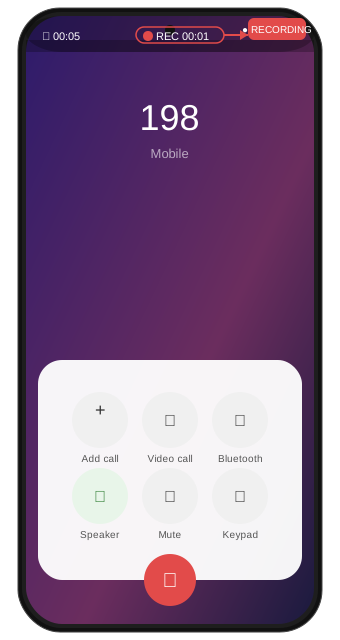
If you are in the UK or Europe and your Samsung does not show a Record button, your options are:
- Good Lock app — Samsung’s customisation tool sometimes unlocks additional call features depending on your device and region. Worth checking in the Galaxy Store
- Third-party call recording apps — covered in the next section
- Speakerphone method — put the call on speaker and use a separate voice recorder app to capture the audio. Not elegant but it works
Best Call Recording Apps for Android
If your phone does not have built-in call recording, a good third-party app is your next option.
Here are the most trusted ones:
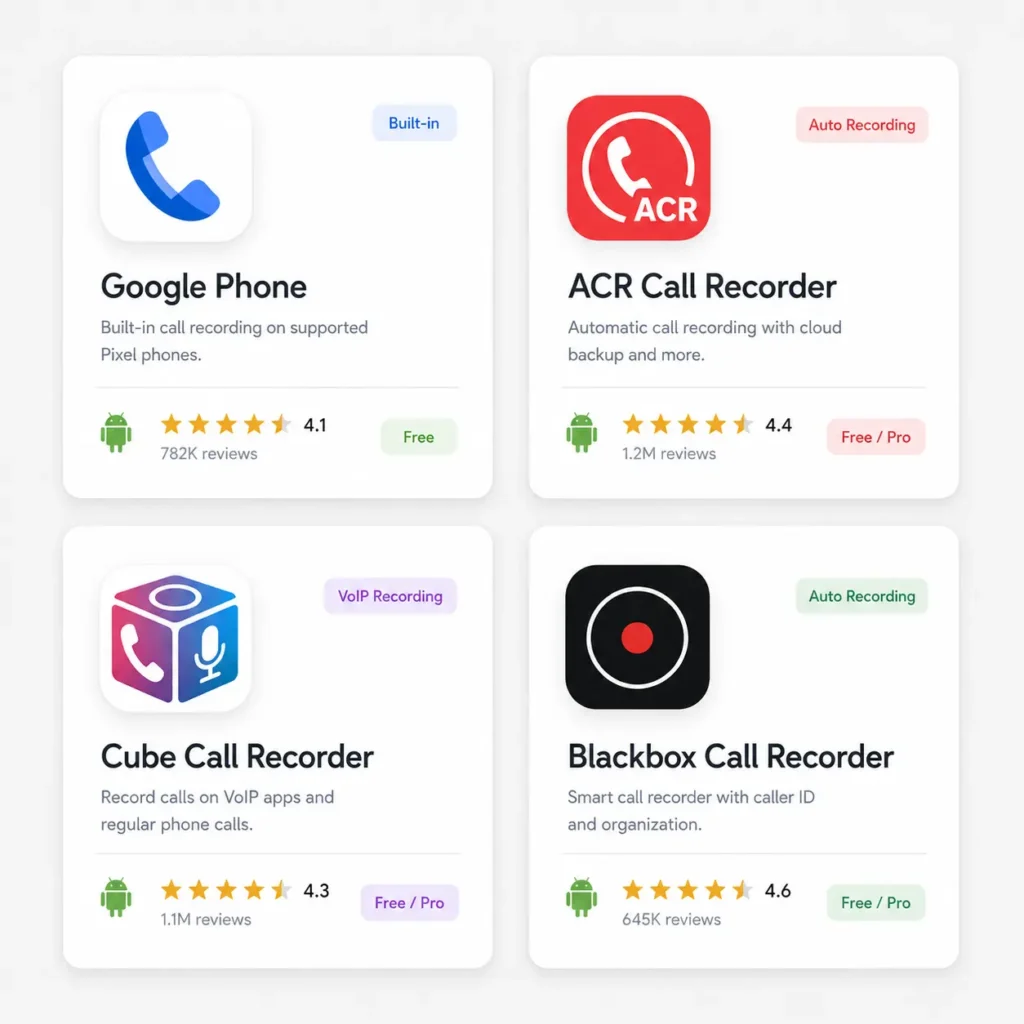
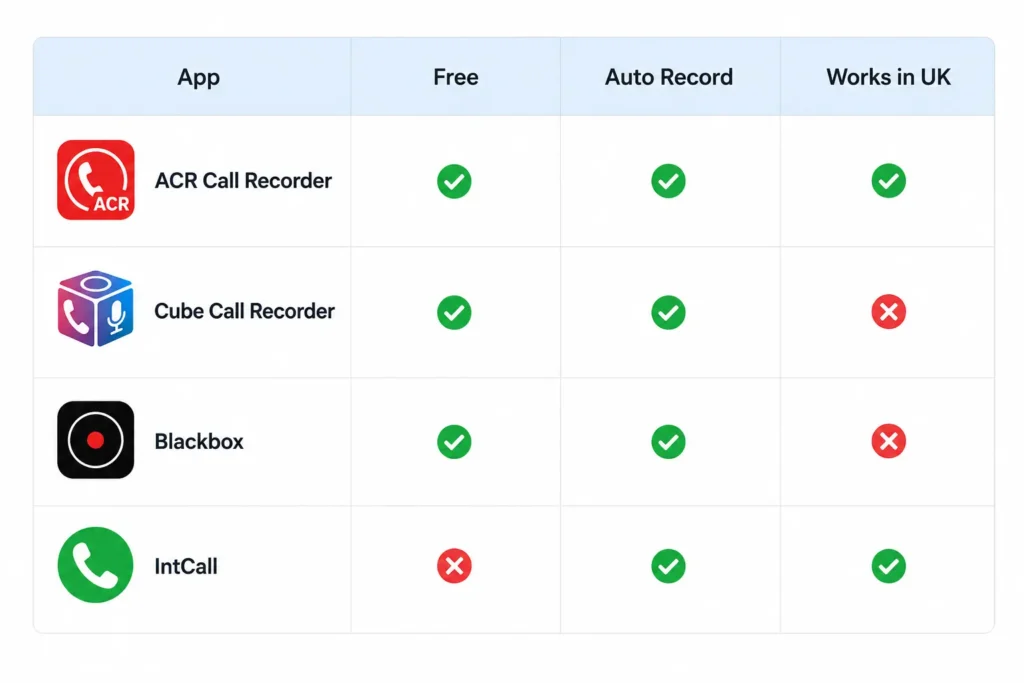
ACR Call Recorder One of the most popular call recording apps on Android. It supports automatic recording for all calls or selected contacts only. The free version covers the basics well and the Pro version adds cloud backup and extra features. Works on most Android devices.
Cube Call Recorder Cube is known for working on devices where other apps struggle. It also records VoIP calls from WhatsApp, Skype and Viber which most apps cannot do. A solid choice if you make a lot of internet calls.
Blackbox Call Recorder Clean interface, reliable recording and good automatic call detection. Free to use with optional upgrades.
Call Recorder – IntCall Better suited for international calls. Not free but very reliable for business users who need consistent quality recordings.
A word of warning, since Android 9 and especially Android 10, Google has restricted the microphone access that third-party apps can use during calls. This means some apps may only record your side of the conversation clearly while the other person sounds quiet or muffled. Always test with a short call first before relying on any app for something important.
How to Automatically Record All Calls on Android
Manually tapping record on every call gets old very quickly. Most serious call recording apps support automatic recording so you never miss anything.
Here is how to set it up in ACR Call Recorder:
- Open ACR Call Recorder
- Tap the three-dot menu in the top right
- Go to Settings
- Find Automatic Recording and toggle it on
- Choose whether to record all calls or only specific contacts
Once enabled, every incoming and outgoing call will be recorded automatically without you doing anything. Recordings appear in the app’s library sorted by date and contact name.
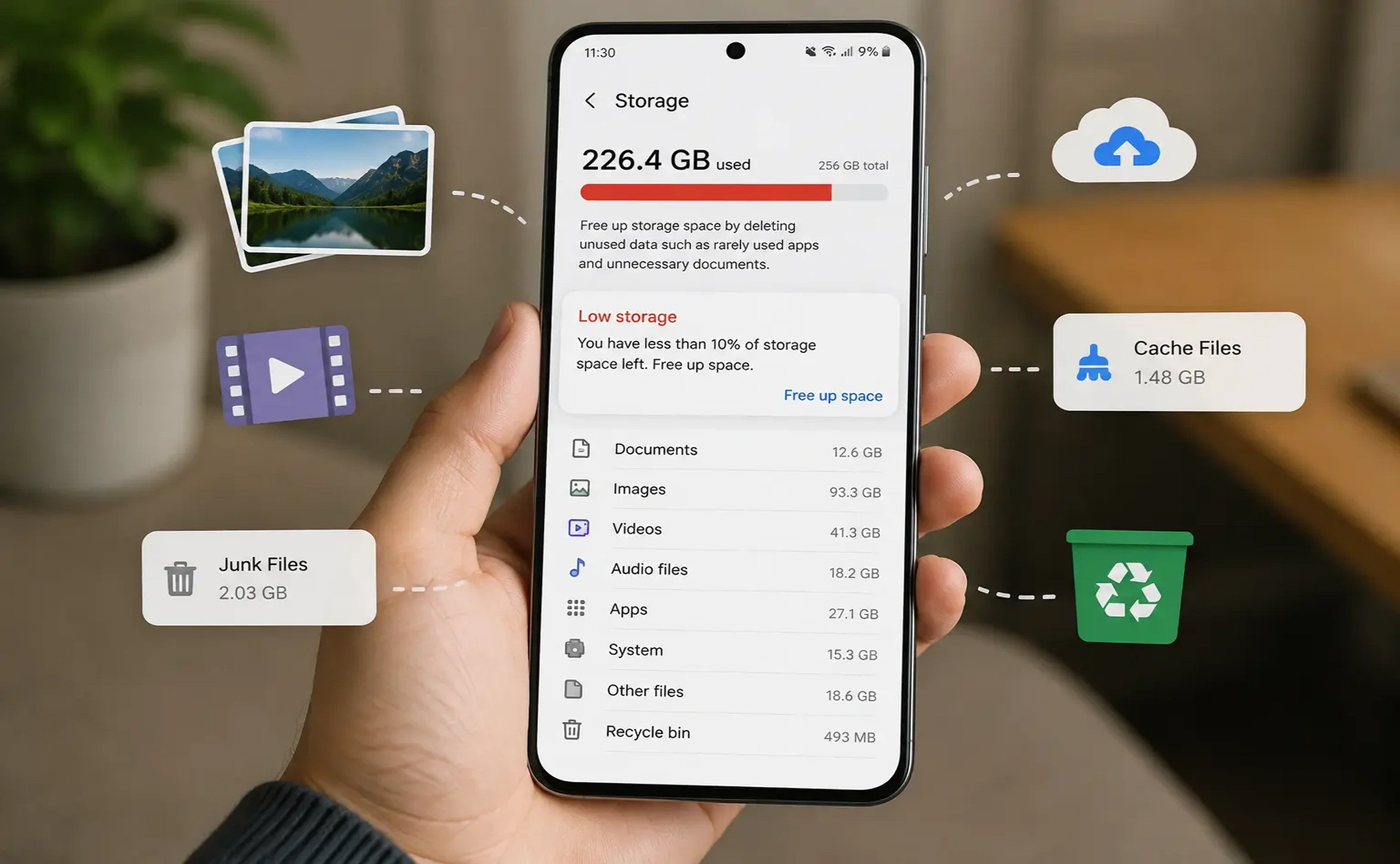
Keep in mind that automatic recording can fill up your storage quickly if you make a lot of calls. Set a limit on how many recordings to keep or back them up to Google Drive regularly.
Where Are Call Recordings Saved on Android?
This depends on which method or app you use.
Google Phone app — Recordings are stored inside the app itself. Go to Recents, tap the call, and you will find the recording there. You can share it directly from that screen.
Third-party apps like ACR — Recordings are usually saved in your internal storage under a folder called Call Recordings or the app’s own named folder. You can find them using the Files by Google app.
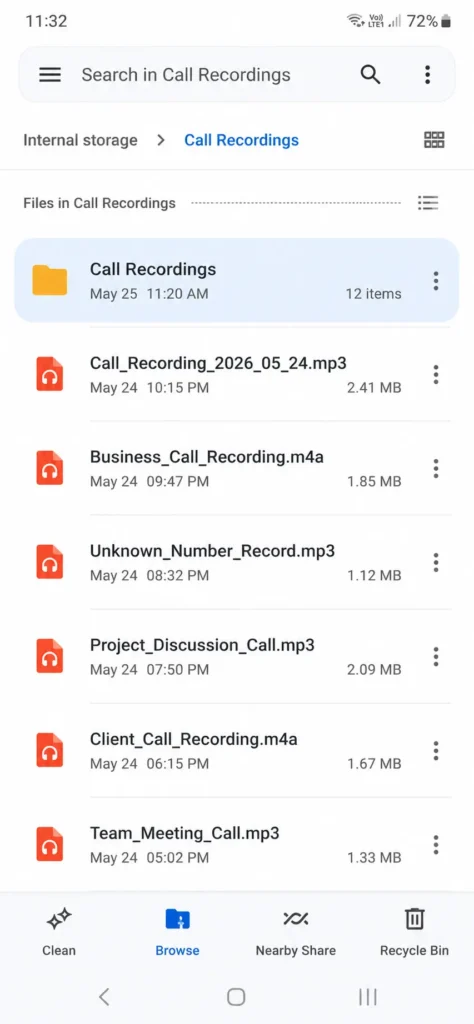
Samsung built-in recorder — Saved to internal storage in a folder named Call or Recordings depending on your device.
If you need to share or back up recordings, you can upload them to Google Drive or share them directly via WhatsApp, email or any file sharing app.
What to Do if Call Recording Is Blocked on Your Android
Since Android 10 and even more with newer Android versions like Android 16, Google has made it harder for third-party apps to record calls properly. If your recordings are missing the other person’s voice or sound muffled, here are your most realistic options.
Use a phone with native recording — The most reliable solution. Google Pixel phones handle this best.
Speakerphone plus voice recorder — Old school but effective. Put the call on speaker, open a voice recorder app like Google Recorder, and record the room audio. Quality will not be perfect but it captures both sides.
Google Voice — If you are in the US, Google Voice allows call recording for incoming calls. Press 4 during a call to start recording.
VOIP apps — Some apps like Zoom or Microsoft Teams have built-in recording features when used for calls. If your calls can move to these platforms, recording becomes much easier and fully legal.
with a short call before using it for anything important.
Android 10 and above may limit recording quality on some devices
depending on your phone brand and region.
Frequently Asked Questions
Can I record a phone call on Android without the other person knowing?
Technically some apps allow it, but whether it is legal depends entirely on your country. In two-party consent regions like parts of the US, recording without consent is illegal. Always check your local laws.
Is call recording legal in the UK?
Yes, under the Regulation of Investigatory Powers Act you can record calls you are a part of for personal use. However, sharing those recordings without a legitimate reason can get complicated legally.
Why is call recording blocked on my Android?
Android 10 and above restricts microphone access for third-party apps during calls. Some manufacturers also disable call recording in certain regions. Using native recording features or a Pixel phone avoids this problem.
What is the best free call recording app for Android?
ACR Call Recorder is the most widely used free option. Cube Call Recorder is a strong alternative especially if you need VoIP call recording.
Do call recording apps work on all Android phones?
Not always. Results vary by device, Android version and region. Always test an app with a short call before relying on it for anything important.
Before You Hit Record
Recording calls on Android is simple once you know the right method for your phone. Pixel users have it easiest with the built-in app everyone else, ACR or Cube will do the job well.
Just remember one thing before you hit record, check your local laws and let the other person know. Two seconds of honesty saves a lot of headaches.
Have a question about your specific phone? Drop it in the comments, we read every one.
More Android Guides You Might Find Helpful