
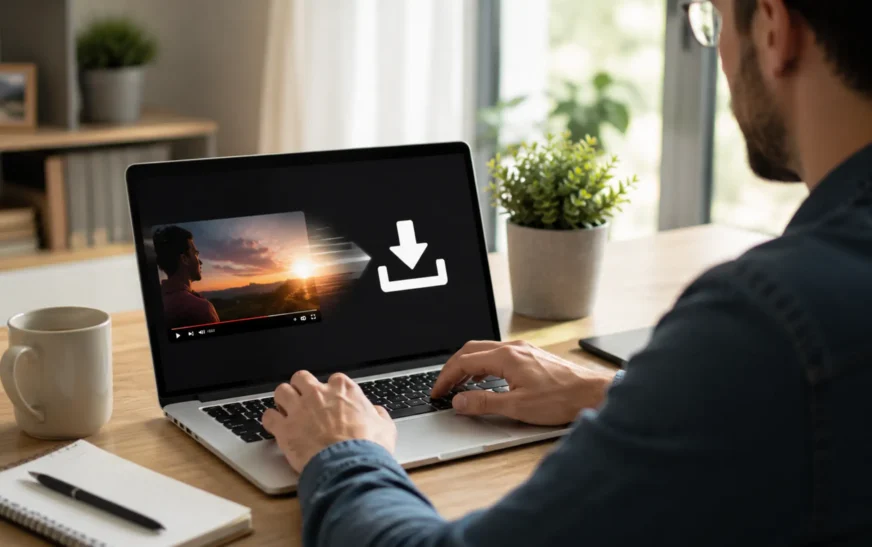
Watching videos offline can be useful when you’re travelling, dealing with a poor internet connection or simply want to save content for later. SSYouTube.com is a browser-based YouTube downloader that lets users download videos without installing additional software or creating an account.
This guide walks you through exactly how it works, what file types and quality you can expect, whether it’s safe, how it runs on mobile, the legal points you should know and which alternatives are worth considering in 2026.
Quick Overview
If you’re in a hurry, here’s SSYouTube at a glance:
| What you want to know | The answer |
|---|---|
| Price | Free |
| Install needed? | No — runs in your browser |
| Works on phones? | Yes, any device |
| File types | MP4, AVI, FLV, MOV, MP3 |
| Max quality | Full HD |
| Sign-up needed? | No |
Quick Verdict
✔ Best for: Occasional offline viewing
✔ Platform: Browser-based
✔ Cost: Free
✔ Installation Required: No
✔ Account Required: No
✔ Mobile Support: Yes
✔ Legal Status: Subject to YouTube’s Terms of Service and copyright laws
How SSYouTube Works
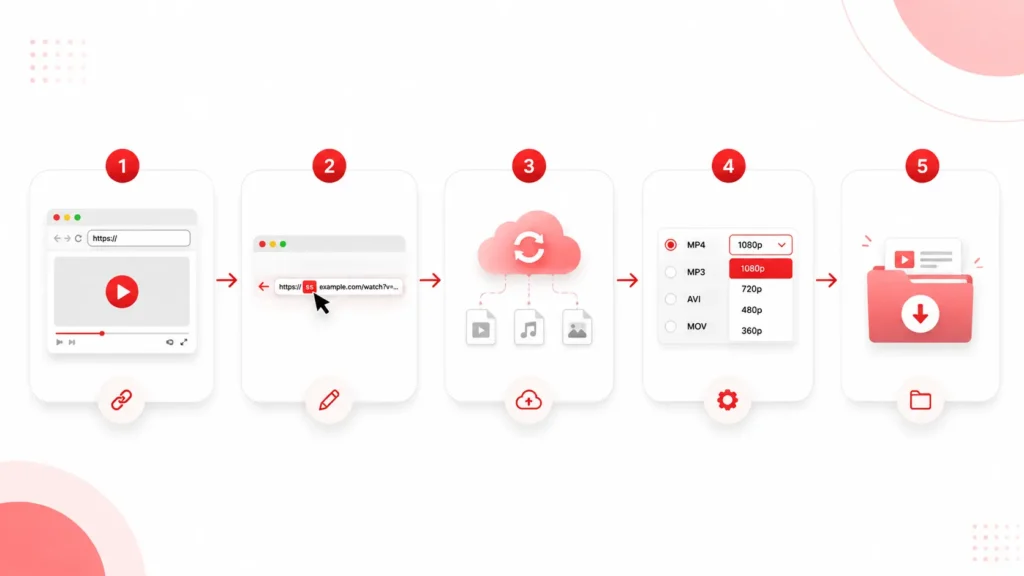
The whole tool is built around one clever shortcut. Take any YouTube link and type “ss” right before the word “youtube.” That’s it. The modified link bounces you over to the SSYouTube download page for that specific video.
So a link like youtube.com/watch?v=XXXX becomes ssyoutube.com/watch?v=XXXX. From there, you pick your format and quality, hit download and the file lands on your device. Because everything happens in the browser, there’s nothing to install and nothing cluttering your phone or computer afterward.
How to Download Videos with SSYouTube
Here’s the full process from start to finish:
- Find your video and copy its link from the address bar.
- Edit the link by adding “ss” in front of “youtube.”
- Hit Enter — you’ll land on the SSYouTube download page.
- Pick your settings — choose a format like MP4 for video or MP3 for audio, plus your quality level.
- Click download and save the file.
The entire thing usually takes under thirty seconds once you’ve done it once.
Using SSYouTube on Mobile (Android & iPhone)
Because SSYouTube runs entirely in a browser, it works on phones and tablets too — though the experience differs a little between Android and iPhone.
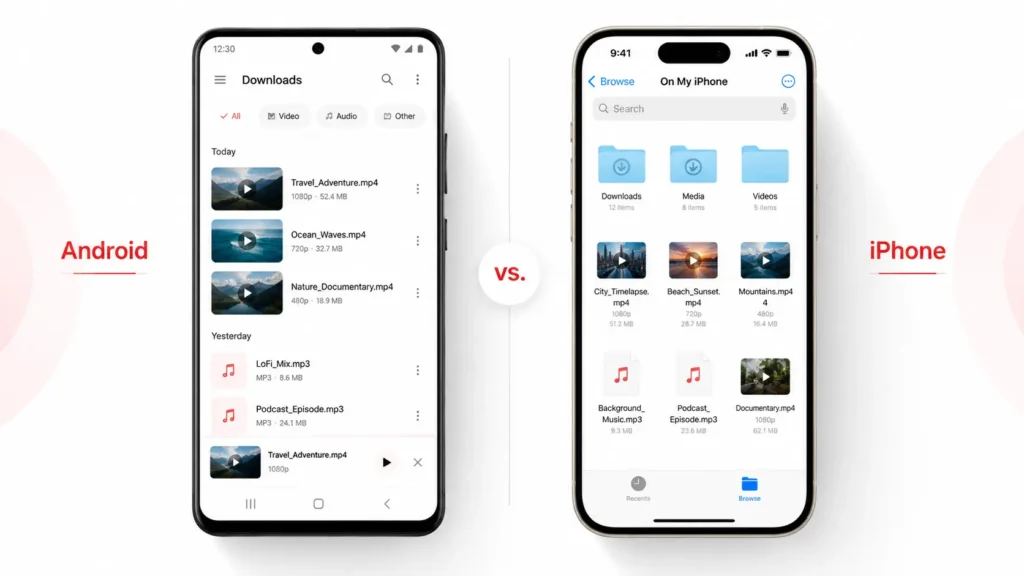
On Android, it’s mostly the same as on a computer. Copy the YouTube link, add “ss” before “youtube” and open it in your mobile browser like Chrome. Downloaded files usually save straight to your Downloads folder, where you can find them in your file manager or gallery.
On iPhone, Apple is stricter about saving files from the browser. Downloads through Safari go into the Files app rather than directly to your camera roll. From there, you can move a video into Photos manually if you want it in your gallery. Some users find using a browser like Chrome or a dedicated Files-app workflow smoother on iOS.
One tip for both: if you’re copying a link from the YouTube app, tap “Share” then “Copy link” to grab the URL, since the app doesn’t show an address bar like a browser does.
What You Can Download — Formats and Quality
SSYouTube doesn’t lock you into a single file type. You can grab videos as MP4, AVI, FLV, MOV or extract the audio as an MP3 — handy for music, podcasts or lectures. If MP4 is your goal, you can also use a dedicated converter — see our guide on how to convert YouTube videos to MP4.
That range matters because different situations call for different files. A Full HD download makes sense for a presentation or big-screen viewing, while a smaller compressed file saves storage on your phone. The tool also serves a global audience, with language support spanning Spanish, German, Italian, Hindi, Russian, Indonesian, Turkish, Japanese, Korean, Thai, and Tiếng Việt — so people worldwide can save their favorite YouTube videos in their own language. As a free 2026 YouTube downloader, it keeps things flexible without charging a cent.
Can You Download Shorts and Playlists?
A common follow-up question is whether SSYouTube handles more than just standard videos.
YouTube Shorts generally work the same way as regular videos. Copy the Short’s link, add “ss” before “youtube,” and you’ll be taken to the download page. Since Shorts are vertical, they download in that same portrait format.
Playlists and entire channels are where browser-based tools like SSYouTube tend to fall short. SSYouTube is built for grabbing videos one at a time, so it isn’t designed for bulk playlist downloads. If you need to save a whole playlist or channel in one go, a desktop app like 4K Video Downloader is a better fit — The tool made specifically for batch downloading playlists, channels, and subtitles.
So for quick, single-video saves, SSYouTube is ideal. For large-scale downloading, reach for a dedicated desktop tool instead.
Why People Keep Using It
Despite the growing number of video downloaders available online, SSYouTube continues to attract users because of its simplicity and convenience.
Several things keep SSYouTube popular despite the crowded field of downloaders. The tool is genuinely easy to use — there’s no learning curve, just a link and a button. Because it skips installation entirely, you’re not downloading software just to download videos. Users also get real choice over format and quality instead of being forced into one option. Best of all, it costs nothing, with no account standing between you and the file. For someone who just wants a quick offline copy, that combination is hard to beat.
Is SSYouTube Safe to Use?
This is one of the most common questions about any video downloader — and a fair one. The honest answer: the tool itself is straightforward, but the bigger risks come from the ads and pop-ups that sites like this often rely on to stay free.
Here’s what to watch for. Free downloader sites frequently show aggressive ads, fake “Download” buttons and pop-ups that try to redirect you elsewhere or push browser notifications. The real download button is usually there — it’s just surrounded by misleading ones. Clicking the wrong one can lead to spam sites or unwanted software.
A few simple habits keep you safe:
- Use an ad blocker to cut out most of the fake buttons and pop-ups.
- Never install anything the site prompts you to download separately — SSYouTube needs no software, so any “install this to continue” message is a red flag.
- Stick to the actual video file you came for and ignore extra offers.
- Keep your browser and antivirus updated as a basic safety net.
As long as you avoid the bait and only grab the file you intended, the process is generally low-risk. But if a site ever pushes you to install an app or enable notifications, close it and move on.
Are YouTube Downloads Legal?
This is the part most guides skip, but it’s the part that matters most.
According to YouTube’s Terms of Service, users generally aren’t permitted to download videos through third-party tools unless a download button or feature is explicitly provided by YouTube. Users should always ensure they have the necessary rights or permission before downloading content.
On top of that, nearly every video on YouTube is protected by copyright. Saving someone’s content without permission can infringe their rights — and that risk grows if you reuse the video commercially. Some uses may qualify as fair use (think education, commentary or research), but fair use is genuinely complicated and differs from country to country. If money or publishing is involved and you’re unsure, talk to a lawyer.
The clean, worry-free route is YouTube Premium. It builds offline downloads right into the official app, stays fully within the rules and supports the creators you’re watching. If you download often, The tool worth the subscription.
SSYouTube Alternatives Worth Knowing
| Tool | Type | Best For | Free |
|---|---|---|---|
| SSYouTube | Web-based | Quick downloads | Yes |
| YouTube Premium | Official service | Offline viewing | No |
| 4K Video Downloader | Desktop app | Playlists & channels | Limited |
| Y2Mate | Web-based | Quick downloads & conversion | Yes |
| ClipGrab | Desktop app | Simple downloads | Yes |
| JDownloader | Desktop app | Batch downloads | Yes |
No single tool works perfectly every time, so it helps to have backups:
YouTube Premium is the official, fully legal option for offline viewing. 4K Video Downloader is a desktop app built for playlists, channels, and high-quality grabs. Y2Mate is a web tool that works much like SSYouTube. ClipGrab is a free, open-source downloader with a tidy interface. And JDownloader is an open-source manager geared toward batch downloads.
Keep in mind that, apart from YouTube Premium, all of these sit in the same legal grey zone as SSYouTube.
Common SSYouTube Problems and How to Fix Them
Nothing downloads? YouTube changes its site often, which can break these tools temporarily. Refresh the page or grab a fresh link.
Format won’t play? Double-check you picked a file type your device supports, then try another option if needed.
Crawling download speed? This is usually heavy traffic or a shaky connection. Try again later or check your internet.
Site won’t open? The service may be down, blocked in your area, or under maintenance. Waiting a bit often does the trick.
Frequently Asked Questions
Yes, fully free with no account needed.
Downloading copyrighted videos without permission can break YouTube’s terms and copyright law. YouTube Premium is the only fully compliant method.
The tool is simple, but watch out for fake buttons and pop-up ads. Use an ad blocker and never install extra software it prompts you to.
No — it’s entirely browser-based.
MP4, AVI, FLV, MOV and MP3, up to Full HD.
Yes, on any device with a browser and internet.
Shorts work fine for full playlists, use a desktop tool like 4K Video Downloader.
Is SSYouTube Worth Using?
SSYouTube remains a popular choice for users who want a quick and convenient way to save YouTube videos for offline viewing. Its browser-based approach, simple workflow, and free access make it appealing to people who don’t want to install additional software or create an account.
However, convenience shouldn’t come at the expense of caution. Users should be aware of copyright restrictions, YouTube’s Terms of Service, and the potential risks associated with third-party download websites, such as misleading ads or fake download buttons. If you’re looking for an official and fully compliant solution, YouTube Premium offers built-in offline viewing while supporting content creators.
For users who understand the limitations and use it responsibly, SSYouTube can be a practical tool for occasional video downloads.
Tried SSYouTube or a different downloader? Tell us how it went in the comments.